Building Systems That Scale: The 3-Phase Framework for Growing Teams
Abstract
Most teams build systems that multiply instead of scale—adding tools, channels, and documentation until clarity becomes chaos. This guide walks you through a 3-phase framework to build organizational systems that grow with your team from day one, from solo founder to 15+ people. You'll learn when to add structure, how to diagnose system problems vs capacity constraints, and the specific anti-patterns that turn lean operations into bureaucratic nightmares.
Table of contents:
The problem: systems that multiply instead of scale
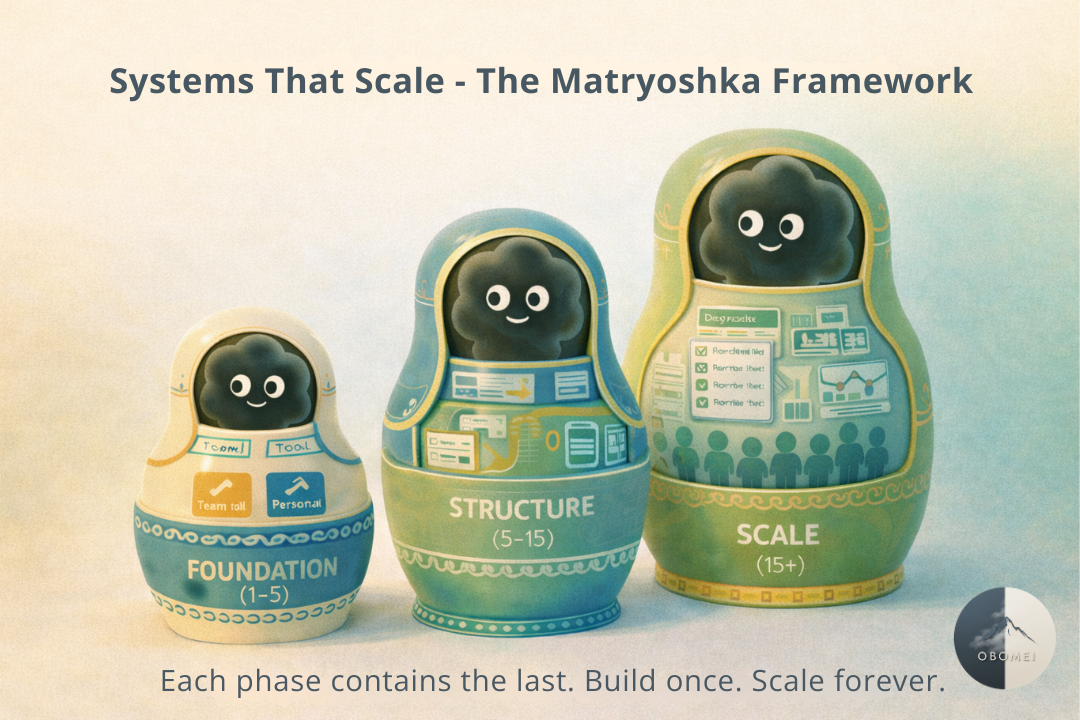
The framework: 3 phases of systems that grow
The Problem: Systems That Multiply Instead of Scale
Here's the pattern every growing team knows too well:
You start lean. One tool. One doc. Everyone knows where everything lives. Then you hire person number three. Someone creates a Slack channel "just for this project." Another person starts a new Google Doc because the shared one is "too messy." A manager introduces their favorite tool because "it's just faster."
Fast forward six months and you have:
20+ Teams channels nobody monitors
An "inactive" SharePoint everyone forgot exists
Shadow IT cropping up because "the official system is too slow"
Three different places people check for the same information
This isn't growth. This is organizational debt.
The symptoms look like coordination problems: miscommunication, dropped balls, duplicated work. But the root cause is structural: you built systems for possibility instead of reality. Every new tool promises to "fix everything." Every new channel claims to "improve communication." Instead, you've created what I call the Kudzu Problem: introduced to solve one issue, now it's swallowing everything in sight.
Research on cognitive load shows why this matters. In his foundational work on short-term memory, Miller (1956) demonstrated that humans can hold roughly 7±2 chunks of information in working memory. When your team needs to check multiple tools, remember which channel owns what decision, and navigate duplicate documentation, you're not just wasting time—you're exhausting your team's cognitive capacity before they even start real work.
The stakes: Systems that multiply create three types of waste:
Search waste - Time spent hunting for information across scattered tools
Coordination waste - Meetings to "align" because systems don't show status
Rework waste - Duplicated effort because work isn't visible
Before you hire your next person, before you add another tool, you need systems designed to scale.
The Framework: 3 Phases of Systems That Grow
Growing teams need different systems at different stages. Add structure too early and you're drowning in process nobody needs. Add it too late and you're firefighting chaos. Here's the map:
Phase 1 - Foundation (1-5 people): Minimize Friction
Core principle: Keep it stupidly simple (K.I.S.S.). Two tools maximum.
At this stage, speed beats structure. You need just enough system to avoid chaos, but not so much that process slows execution. The goal is removing friction, not building enterprise architecture.
The 2-Tool Rule
Pick exactly two tools and commit to them:
One for the team that provides shared visibility and integrated workflows (Notion, Asana, Linear).
One for yourself that serves as your personal command center.
Why does this matter? Every tool you add creates hidden costs that compound over time. There's the switching cost, which Leroy (2009) calls "attention residue": when you shift between interfaces, part of your mind stays stuck on the previous context, degrading performance on whatever you move to next. Then there's maintenance cost, because someone has to keep data current across systems. And finally decision cost, where "where should this live?" becomes a daily tax on your team's attention.
Before adding any new tool, run it through a simple filter:
☑ Does it integrate with what you already use?
☑ Can you easily share it with others?
☑ Do you actually enjoy using it?
Living Documentation
At this stage, documentation should be minimal and alive. You need exactly three things. A project tracker with clear owners, status, and next steps. A decision log capturing what was decided, by whom, and why. And an onboarding doc explaining how you work and where things live.
Nothing else. No folders full of "context." No version histories labeled "final-final-v3." If a doc hasn't been updated in 3 months, delete it.
🚩 Red flags you're leaving Phase 1:
People ask "where should I put this?" more than once per week
You've had the same miscommunication twice
Onboarding a new person takes more than 2 hours of documentation reading
Phase 2 - Structure (5-15 people): Design for Async
Core principle: Default to clarity over speed.
You can no longer operate on "everyone just knows." Information that lives in one person's head becomes a bottleneck. You need systems that answer questions before people ask them.
The async-first shift
In her research on always-on work culture, Perlow (2012) found that teams who established "predictable time off" from constant communication actually became more productive, not less. The counterintuitive truth: default-to-documentation beats default-to-meeting.
Most teams confuse visibility with alignment:
Visibility answers "What's going on?"
Alignment answers "What are we moving forward next, and who owns it?"
Dashboards give you visibility. Living systems give you alignment.
Design principles for async work
Single source of truth. Pick one shared space where work happens in the open. Not scattered across Slack threads, email chains, and meeting notes. One place. Bernstein and Turban (2018) studied this at Harvard and found something surprising: even physical proximity doesn't guarantee collaboration. When they tracked employees in open-plan offices, face-to-face interaction actually dropped by 70% because people retreated to digital channels. The lesson? Proximity assumptions fail. Intentional systems win.
Living docs beat versions. Kill the v1/v2/final-final loop. Every document should have a clear owner responsible for keeping it current, a "last updated" date visible at the top, and a changelog if decisions changed. If you're emailing attachments, your system is broken.
Clear ownership on everything. Every task, every decision, every document needs an owner. Not "the team." Not "whoever has time." One human who owns the outcome.
🚩 Red flags you're leaving Phase 2:
Work gets "90% done" then stalls for weeks
The same questions get asked in three different channels
New people take 2+ weeks to feel productive
Phase 3 - Scale (15+ people): Diagnose Before You Expand
Core principle: Fix the system before you add capacity.
At this stage, the temptation is always to hire. Everyone's overwhelmed. Deadlines slip. The obvious answer seems to be "add more people."
But here's what operations research shows: In his work on queueing theory, Little (1961) proved that adding resources to a broken system just gives you more resources working inefficiently. Before you hire, run this diagnostic to separate system problems from true capacity constraints:
1. Map your flow
As Goldratt (1984) demonstrated in The Goal, the first step is always to identify the constraint. Track how work moves from intake to delivery. Where does it pile up? Where does it wait? Those queues reveal your real bottleneck, and it's usually not headcount.
Draw it out:
Intake → Planning → Execution → Review → Delivery
   ↓               ↓                   ↓                        ↓                   ↓
 Queue?       Queue?        Queue?         Queue?       Queue?

Where work piles up is where your system breaks.
2. Spot the variability
The Theory of Constraints teaches us that a system's output is limited by its slowest step, but variability makes that bottleneck worse. Some work arrives in waves. Some tasks take 2 hours, others 20. That unpredictability kills flow faster than understaffing. The fix is threefold: batch similar work together to reduce task-switching, standardize what you can with templates and checklists, and separate predictable work from variable work by giving them different tracks and different owners.
3. Protect focused time
Are your people calendar-blocking deep work and batching admin into dedicated windows? Or are they context-switching all day between meetings, messages, and "quick tasks"?
Mark, Iqbal, Czerwinski, and Johns (2014) tracked attention patterns across the workday and found that focus follows predictable rhythms. Your 9am brain isn't your 4pm brain. Calendar-first planning that respects these rhythms beats reactive scheduling every time. If everyone's calendar is fragmented into 30-minute gaps, you don't have a capacity problem; you have a design problem.
4. Define "done"
If work lingers at "90% complete," you don't have a capacity problem; you have a clarity problem. This is what Covey (1989) calls "begin with the end in mind" and what Brown (2018) describes as "Describing Done": before any work starts, answer the question What does success actually look like here? Tighten your acceptance criteria by answering three questions: What does done look like for this type of work? Who approves it? Where does it go after completion?
If these four moves restore predictability, congratulations: you just found capacity without touching payroll.
When to actually add capacity
Three signals tell you it's a true capacity constraint. Your flow is stable and predictable, yet capacity stays saturated across several cycles. The bottleneck is a specialized, repetitive task that's already optimized (perfect for AI delegation). Queues stay high even after you've reduced variability and fixed scheduling.
That's when more resources help, whether that's an FTE, an AI agent handling routine work, or delegating to specialists.
Patterns of Productivity Theater
There's a dangerous gap between looking productive and being effective. I call it Productivity Theater: the rituals, tools, and processes that feel like progress but don't actually move work forward.
Research shows that biology-first systems, those built around natural energy rhythms and sustainable work cycles, compound when woven together. Planning with your peak hours, executing in focused sprints, and closing the loop with reflection aren't separate hacks; they're interdependent rituals. But when systems break down, teams default to theater instead of substance.
Here are the six patterns that turn lean operations into bureaucratic nightmares:
Anti-Pattern 1: The Tool Collector
Symptom: "Let's just try this new tool, it might help"
Reality: Every tool you add without removing one creates integration debt.
Anti-Pattern 2: The Documentation Hoarder
Symptom: "We should keep this... just in case"
Reality: Docs that are never pruned become overgrown. Looks full, produces nothing. Think of it like a man-drawer stuffed with mystery cables and phone chargers for devices you no longer own.
Anti-Pattern 3: The Meeting Default
Symptom: "Let's have a quick sync to align on this"
Reality: If your system required a meeting to create clarity, your system failed. Microsoft's Human Factors Lab (2021) found that back-to-back meetings increase stress markers by 10-13%, while even short breaks allow the brain to reset.
Anti-Pattern 4: The Scale Trap
Symptom: "This works great for us, let's roll it out to everyone!"
Reality: Systems that work for 3 people often break at 10, and collapse at 30. Scale in phases. Pilot with one team. Learn. Iterate. Then expand.
Anti-Pattern 5: The Consensus Paralysis
Symptom: "Everyone needs to weigh in before we decide"
Reality: Clear ownership beats collective input every time. Dalio (2017) puts it plainly in Principles: your goal should be to make yourself redundant, because bottlenecks limit speed.
Anti-Pattern 6: The Automation Mirage
Symptom: "If we just automate this, everything will be faster"
Reality: Automating a broken process just produces broken outputs faster. Fix the workflow first, then automate the repetitive parts.
Conclusion: Build Once, Scale Forever
The best systems are invisible. Your team doesn't think about where to put information—they just put it in the obvious place. They don't wonder who owns a decision—it's clear from the system. They don't need meetings to "get aligned"—the work is already visible.
That's the goal: systems so well-designed they disappear.
Your next steps:
Run the Phase diagnostic—where is your team today? (1-5, 5-15, or 15+)
Pick one anti-pattern to fix this week
Start the 90-day roadmap with Month 1, Week 1
When you build systems that scale from day one, growth doesn't create chaos—it creates compound momentum. 🌪️
Ready to turn chaos into clarity?
At Obomei, we help small teams design systems that scale—so you can grow without the growing pains. Whether you're dealing with tool sprawl, documentation nightmares, or the "do we need to hire?" question, we'll help you diagnose the real problem and build the right system.
Let's connect if you're ready to stop multiplying systems and start scaling them.
#SystemsThinking #ScalingTeams #OperationalExcellence #StartupOps #RemoteWork #ProcessDesign #TeamAlignment
